
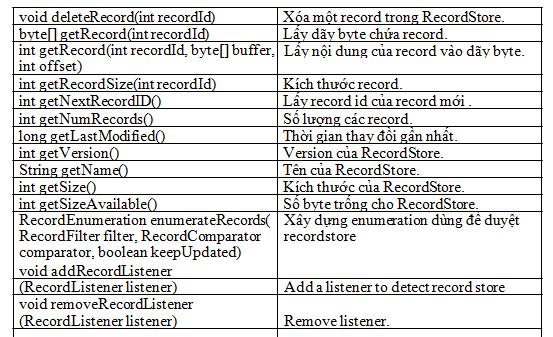
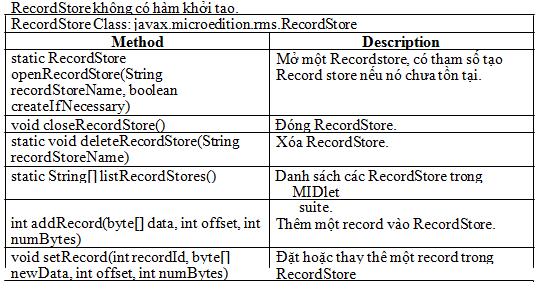
Chúng ta hãy cùng xem qua 2 ví dụ đơn giản của việc đọc ghi record trong
RecordStore.
Ví dụ 1: đọc và ghi đối tượng string (ReadWrite.java)
/*--------------------------------------------------
* ReadWrite.java
*
* Read and write to the record store.
*
* No GUI interface, all output is to the console
*-------------------------------------------------*/
import java.io.*;
import javax.microedition.midlet.*;
import javax.microedition.rms.*;
public class ReadWrite extends MIDlet
{
private RecordStore rs = null;
static final String REC_STORE = "db_1";
public ReadWrite()
{
openRecStore(); // Create the record store
// Write a few records and read them back
writeRecord("J2ME and MIDP");
writeRecord("Wireless Technology");
readRecords();
closeRecStore(); // Close record store deleteRecStore(); // Remove the record store
}
public void destroyApp( boolean unconditional )
{
}
public void startApp()
{
// There is no user interface, go ahead and shutdown
destroyApp(false);
notifyDestroyed();
}
public void pauseApp()
{
}
public void openRecStore()
{
try
{
// Create record store if it does not exist
rs = RecordStore.openRecordStore(REC_STORE, true );
}
catch (Exception e)
{
db(e.toString());
}
}
public void closeRecStore()
{
try
{
rs.closeRecordStore();
}
catch (Exception e)
{
db(e.toString());
}
}
public void deleteRecStore()
{
if (RecordStore.listRecordStores() != null)
{
try
{
RecordStore.deleteRecordStore(REC_STORE);
}
catch (Exception e)
{
db(e.toString());
}
}
}
public void writeRecord(String str)
{
byte[] rec = str.getBytes();
try
{
rs.addRecord(rec, 0, rec.length);
}
catch (Exception e)
{
db(e.toString());
}
}
public void readRecords()
{
try
{
byte[] recData = new byte[50];
int len;
for (int i = 1; i <= rs.getNumRecords(); i++)
{
len = rs.getRecord( i, recData, 0 ); System.out.println("Record #" + i + ": " +
new String(recData, 0, len));
System.out.println("------------------------------");
}
}
catch (Exception e)
{
db(e.toString());
}
}
/*--------------------------------------------------
* Simple message to console for debug/errors
* When used with Exceptions we should handle the
* error in a more appropriate manner.
*-------------------------------------------------*/
private void db(String str)
{
System.err.println("Msg: " + str);
}
}
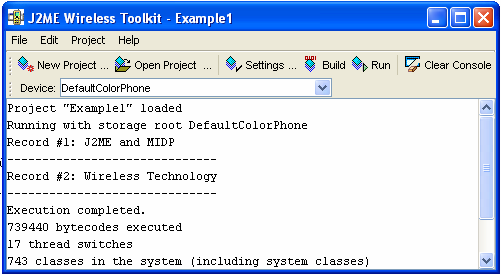
Đây là output của ví dụ 1:
Hàm để mở một recordstore
public void openRecStore()
{
try
{
// Create record store if it does not exist
rs = RecordStore.openRecordStore(REC_STORE, true );
}
catch (Exception e)
{
db(e.toString());
}
}
Với tham số true, hàm sẽ tạo một RecordStore nếu nó chưa tồn tại.
Trong hàm WriteRecord, trước khi lưu vào RecordStore, cần phải chuyển đổi kiểu string thành dãy byte:
byte[] rec = str.getBytes();
...
rs.addRecord(rec, 0, rec.length);
Trong hàm ReadRecord, chúng ta cũng cần đọc một dãy byte:
byte[] recData = new byte[50];
...
len = rs.getRecord( i, recData, 0 );
Cần lưu ý là trong ví dụ trên do biết trước kích thước của string nên khai báo dãy byte vừa đủ, trong thực tế ta nên kiểm tra kích thước của record để khai báo dãy byte cần thiết để tránh phát sinh lỗi, do đó hàm ReadRecord có thể sửa lại như sau:
for (int i = 1; i <= rs.getNumRecords(); i++)
{
if (rs.getRecordSize(i) > recData.length) recData = new byte[rs.getRecordSize(i)]; len = rs.getRecord(i, recData, 0); System.out.println("Record #" + i + ": " + new String(recData, 0, len));
System.out.println("------------------------------");
}
Nếu chỉ cần đọc ghi những đoạn text vào record, thì ví dụ trên là quá đủ. Tuy nhiên, thực tế là ta cần lưu những giá trị khác: String, int, boolean, v.v… Trong ví dụ 2 này, chương trình sẽ sử dụng stream để đọc và ghi record. Việc sử dụng stream giúp chúng ta linh động và nâng cao hiệu quả của việc đọc và ghi dữ liệu vào RecordStore.
Ví dụ 2: đọc và ghi sử dụng stream (ReadWriteStreams.java)
/*--------------------------------------------------
* ReadWriteStreams.java
*
* Use streams to read and write Java data types
* to the record store.
*
* No GUI interface, all output is to the console
*-------------------------------------------------*/
import java.io.*;
import javax.microedition.midlet.*;
import javax.microedition.rms.*;
public class ReadWriteStreams extends MIDlet
{
private RecordStore rs = null; // Record store
static final String REC_STORE = "db_1"; // Name of record store
public ReadWriteStreams()
{
openRecStore(); // Create the record store writeTestData(); // Write a series of records readStream(); // Read back the records closeRecStore(); // Close record store deleteRecStore(); // Remove the record store
}
public void destroyApp( boolean unconditional )
{
}
public void startApp()
{
// There is no user interface, go ahead and shutdown
destroyApp(false);
notifyDestroyed();
}
public void pauseApp()
{
}
public void openRecStore()
{
try
{
// Create record store if it does not exist
rs = RecordStore.openRecordStore(REC_STORE, true );
}
catch (Exception e)
{
db(e.toString());
}
}
public void closeRecStore()
{
try
{
rs.closeRecordStore();
}
catch (Exception e)
{
db(e.toString());
}
}
public void deleteRecStore()
{
if (RecordStore.listRecordStores() != null)
{
try
{
RecordStore.deleteRecordStore(REC_STORE);
}
catch (Exception e)
{
db(e.toString());
}
}
}
/*--------------------------------------------------
* Create three arrays to write to record store
*-------------------------------------------------*/
public void writeTestData()
{
String[] strings = {"Text 1", "Text 2"}; boolean[] booleans = {false, true}; int[] integers = {1 , 2};
writeStream(strings, booleans, integers);
}
/*--------------------------------------------------
* Write to record store using streams.
*-------------------------------------------------*/
public void writeStream(String[] sData, boolean[] bData,int[] iData)
{
try
{
// Write data into an internal byte array
ByteArrayOutputStream strmBytes =
new ByteArrayOutputStream();
// Write Java data types into the above byte array
DataOutputStream strmDataType =
new DataOutputStream(strmBytes);
byte[] record;
for (int i = 0; i < sData.length; i++)
{
// Write Java data types
strmDataType.writeUTF(sData[i]);
strmDataType.writeBoolean(bData[i]);
strmDataType.writeInt(iData[i]);
// Clear any buffered data
strmDataType.flush();
// Get stream data into byte array and write record
record = strmBytes.toByteArray();
rs.addRecord(record, 0, record.length);
// Toss any data in the internal array so writes
// starts at beginning (of the internal array)
strmBytes.reset();
}
strmBytes.close();
strmDataType.close();
}
catch (Exception e)
{
db(e.toString());
}
}
/*--------------------------------------------------
* Read from the record store using streams
*-------------------------------------------------*/
public void readStream()
{
try
{
// Careful: Make sure this is big enough!
// Better yet, test and reallocate if necessary byte[] recData = new byte[50];
// Read from the specified byte array
ByteArrayInputStream strmBytes =
new ByteArrayInputStream(recData);
// Read Java data types from the above byte array
DataInputStream strmDataType =
new DataInputStream(strmBytes);
for (int i = 1; i <= rs.getNumRecords(); i++)
{
// Get data into the byte array
rs.getRecord(i, recData, 0);
// Read back the data types
System.out.println("Record #" + i);
System.out.println("UTF: " + strmDataType.readUTF());
System.out.println("Boolean: " +
strmDataType.readBoolean());
System.out.println("Int: " + strmDataType.readInt());
System.out.println("--------------------");
// Reset so read starts at beginning of array
strmBytes.reset();
}
strmBytes.close();
strmDataType.close();
}
catch (Exception e)
{
db(e.toString());
}
}
/*--------------------------------------------------
* Simple message to console for debug/errors
* When used with Exceptions we should handle the
* error in a more appropriate manner.
*-------------------------------------------------*/
private void db(String str)
{
System.err.println("Msg: " + str);
}
}
Output của ví dụ 2:
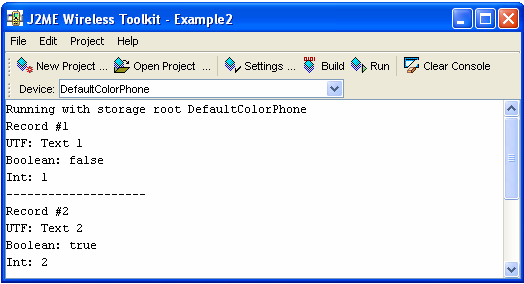
Dữ liệu ghi vào record trong ví dụ 2 gồm: String[] strings = {"Text 1", "Text 2"}; boolean[] booleans = {false, true};
int[] integers = {1 , 2};
Hàm WriteStream sẽ ghi dữ liệu vào RecordStore
// Write data into an internal byte array
ByteArrayOutputStream strmBytes = new ByteArrayOutputStream();
// Write Java data types into the above byte array
DataOutputStream strmDataType = new DataOutputStream(strmBytes);
byte[] record;
for (int i = 0; i < sData.length; i++)
{
// Write Java data types strmDataType.writeUTF(sData[i]); strmDataType.writeBoolean(bData[i]); strmDataType.writeInt(iData[i]);
// Clear any buffered data strmDataType.flush();
// Get stream data into byte array and write record record = strmBytes.toByteArray(); rs.addRecord(record, 0, record.length);
// Toss any data in the internal array so writes
// starts at beginning (of the internal array)
strmBytes.reset();
}
Hàm đã sử dụng hai stream là strmBytes là một mảng byte sẽ ghi vào RecordSotre và strmDataType để chứa dữ liệu. Như vậy quá trình ghi dữ liệu vào RecordStore được thực hiện thông qua các bước:
• Cấp phát stream.
• Ghi dữ liệu vào stream.
• Flush stream.
• Chuyển đổi stream data thành mảng byte.
• Ghi mảng byte vào RecordStore.
• Đóng stream.
Việc đọc các dữ liệu từ record đơn giản chỉ cần thay OutStream thành InputStream:
byte[] recData = new byte[50];
// Read from the specified byte array ByteArrayInputStream strmBytes = new ByteArrayInputStream(recData);
// Read Java data types from the above byte array
DataInputStream strmDataType = new DataInputStream(strmBytes);
for (int i = 1; i <= rs.getNumRecords(); i++)
{
// Get data into the byte array rs.getRecord(i, recData, 0);
// Read back the data types
System.out.println("Record #" + i);
System.out.println("UTF: " + strmDataType.readUTF()); System.out.println("Boolean: " + strmDataType.readBoolean()); System.out.println("Int: " + strmDataType.readInt()); System.out.println("--------------------");
// Reset so read starts at beginning of array strmBytes.reset();
}
hàm
Ở đây, chúng tôi khai báo một mảng byte recData (giống với strmBytes), sau khi gọi
rs.getRecord(i, recData, 0);
Chúng ta đã có mảng byte lúc đầu chương trình ghi vào record, sau đó dùng
InputStream strmDataType để đọc đúng kiểu dữ liệu: System.out.println("UTF: " + strmDataType.readUTF()); System.out.println("Boolean: " + strmDataType.readBoolean()); System.out.println("Int: " + strmDataType.readInt());
Lưu ý: khi sử dụng DataOutputStream và DataInputStream, cần phải đọc và ghi theo
đúng thứ tự, nếu không sẽ không ra kết quả mong muốn.